
Fixed asset verification before SAP go-live — along with inventory verification — should be completed because the accuracy of your asset and inventory master data determines the accuracy of everything SAP produces afterwards — depreciation runs, MIGO/MIRO postings, CARO reporting, and physical stock controls.
An SAP implementation can absorb months of effort in configuration, integration, and user training — and still go live on asset and inventory data that was inaccurate before the project began. SAP faithfully processes whatever master data it is given. If that data is inaccurate, the new ERP simply becomes a more efficient way of reporting inaccurate information — depreciation runs, stock postings, and audit reports built on errors the system inherited rather than created. Data readiness is the layer auditors, CFOs, and statutory reporting depend on from day one, and it is usually the least-resourced part of the project plan.
This guide explains what should be verified before go-live, when in the implementation timeline to do it, and what we commonly find when verification is skipped.
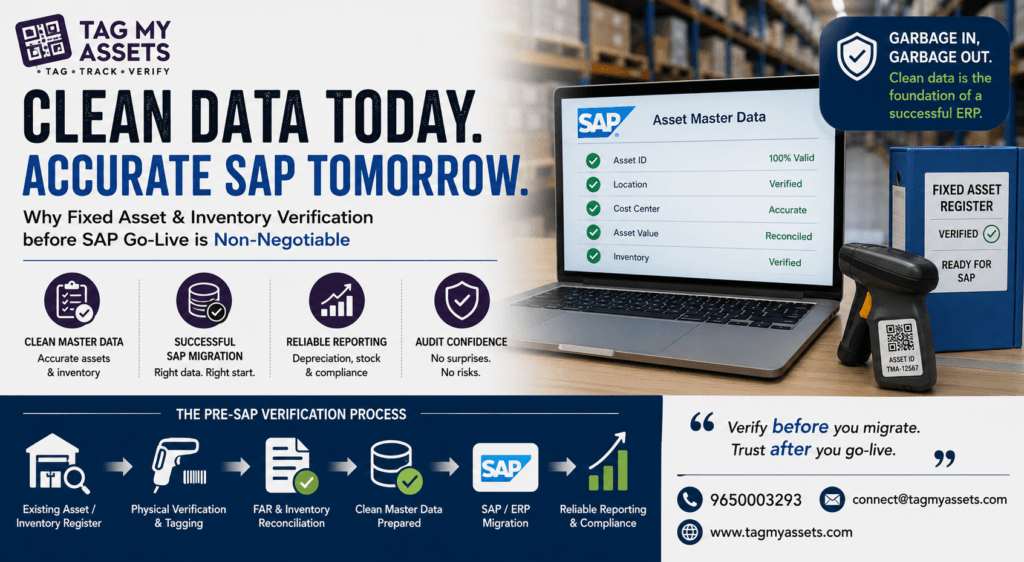
What Happens When Unverified Asset and Inventory Data Is Migrated to SAP
When an unverified FAR or stock ledger is migrated to SAP, every existing error — ghost assets, wrong locations, missing assets, incorrect capitalisation values, duplicate records, and stock discrepancies — is carried into the new system and begins driving depreciation, insurance, stock controls, and audit outputs from the first period close.
In field verification engagements across 1,500+ locations, some patterns appear repeatedly in pre-migration registers:
- Ghost assets: Assets that exist in the register but cannot be physically located — scrapped, transferred, or stolen items never removed from the books. Once migrated, SAP continues depreciating them and they inflate the gross block.
- Unrecorded assets: Physical assets on the floor with no corresponding FAR entry, often from capex booked at a summary level or inter-unit transfers never updated.
- Location and cost centre mismatches: Assets assigned to the wrong plant, storage location, or cost centre. In SAP, this distorts cost centre reporting and makes future physical verification cycles harder.
- Grouped or lump-sum entries: Single FAR line items covering dozens of physical assets (“Plant & Machinery — ₹X”), which cannot be mapped one-to-one to SAP asset master records without physical identification.
- Duplicate and split records: The same asset capitalised twice, or one asset split across entries with inconsistent values.
- Inventory discrepancies: Stock ledger balances that don’t match physical counts — obsolete or damaged inventory still carried at value, incorrect bin/storage locations, and unrecorded consumption. Loaded into SAP MM as opening stock, these become the baseline every future count is measured against.
In one FAR reconciliation engagement, a system register of 19,134 assets could be physically matched to 10,112 verified assets, with value variances exceeding ₹10.5 lakh identified during reconciliation. Differences of this kind are far cheaper to resolve before migration than after.
On one auto components engagement across three plants and a corporate office, verification ahead of a system migration reduced a 9,200-line register to 8,400, with 800 assets written off as no longer physically present. Physical verification took nine working days, and the reconciled register became the asset master the client loaded into SAP.
On one auto components engagement across three plants and a corporate office, verification ahead of a system migration reduced a 9,200-line register to 8,400, with 800 assets written off as no longer physically present. Physical verification took nine working days. The reconciled register became the asset master the client loaded into SAP.Why SAP Makes Pre-Existing Data Errors Harder to Fix
Correcting asset data after SAP go-live is harder because each asset master record is linked to depreciation areas, posted transactions, and period-end closings — so corrections often require asset retirements, write-offs, or transfer postings with audit trail implications, rather than a simple register edit.
Before migration, fixing the FAR is a spreadsheet and documentation exercise. After go-live:
- Depreciation has already posted. Removing a ghost asset means processing a retirement or write-off, with P&L impact in the current period and questions from auditors about why it existed.
- Legacy asset takeover values are locked in. SAP asset migration (typically via AS91/legacy data transfer) fixes takeover values and accumulated depreciation. Correcting these later involves technical adjustments most controllers prefer to avoid.
- Physical-to-system mapping gets frozen. If assets were migrated as grouped entries, itemising them later requires splitting asset records while preserving depreciation history — significantly more effort than tagging and itemising before migration.
- CARO 2020 reporting inherits the problem.Clause 3(i)(b) requires reporting on whether fixed assets have been physically verified at reasonable intervals and whether material discrepancies were dealt with. A migration built on an unverified FAR makes this a recurring audit finding rather than a closed item.
ERP implementations are technology projects, but master data quality is a business responsibility.
What Pre-Go-Live Verification Should Cover
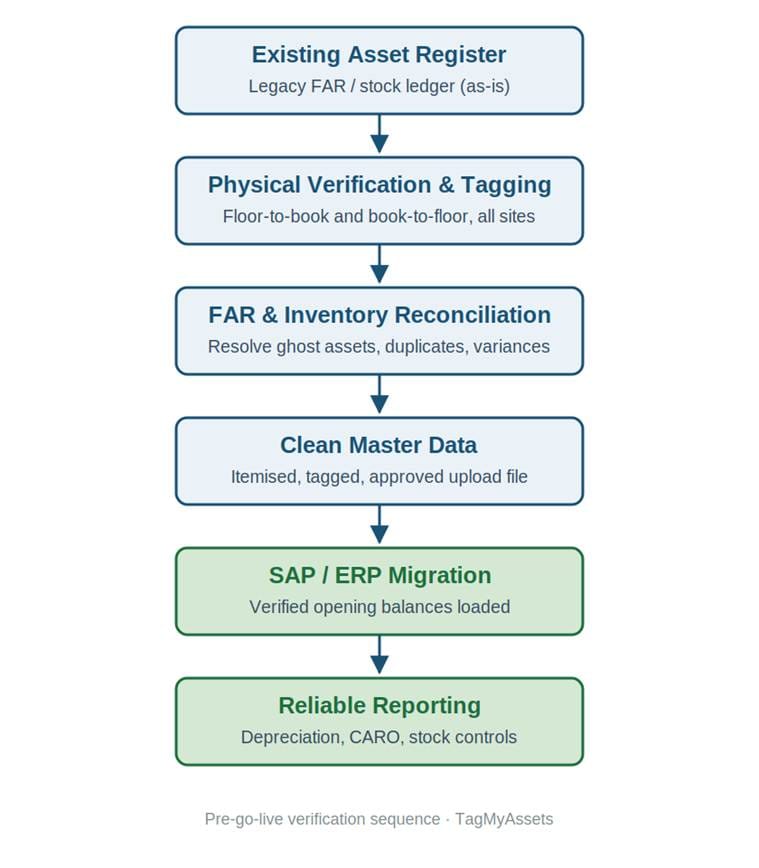
A pre-go-live verification exercise should cover physical verification of fixed assets, asset tagging with unique identifiers, FAR reconciliation (physical-to-book matching), inventory count and reconciliation, and preparation of a cleaned, itemised asset master upload file.
1. Physical verification of fixed assets
A floor-to-register and register-to-floor check at each plant, office, and warehouse in scope. This identifies ghost assets, unrecorded assets, and location mismatches. For multi-location companies, this is typically sequenced site by site in the months before data migration cutoff.
2. Asset tagging with unique identifiers
Each verified asset receives a durable tag — barcode, QR, or RFID depending on the environment — carrying a unique asset code. This code becomes the link between the physical asset and its SAP asset master record (commonly mapped to the inventory number or a custom field). Without tags, the next verification cycle starts from zero again.
3. FAR reconciliation
Matching physically verified assets to book records line by line, resolving duplicates, splitting grouped entries into itemised records, and documenting discrepancies for management action — write-off approvals, capitalisation of unrecorded assets, and value corrections — before the migration file is prepared.
4. Inventory verification
A full or cycle count of raw materials, WIP, stores and spares, and finished goods, reconciled against the stock ledger. Opening stock quantities and values loaded into SAP MM at go-live should reflect a physically verified position, not a rolled-forward book balance.
5. Migration-ready asset master file
The output that matters: a cleaned, itemised, tagged asset listing with locations, cost centres, capitalisation dates, values, and useful lives, formatted for the implementation partner’s upload templates. This is where verification work converts directly into migration quality.
When should fixed Asset Verification before SAP Go-Live be Scheduled
Verification should be scheduled during the realisation phase, so that reconciliation and management approvals are complete before the data migration cutoff — typically finishing 4–8 weeks before go-live, with a short delta verification for assets added between the count date and cutoff.
A workable sequence for a multi-location implementation:
| Implementation phase | Verification activity |
| Blueprint / design | Define asset numbering, tagging standard, and location master alignment with SAP org structure |
| Realisation (early) | Physical verification and tagging, site by site |
| Realisation (late) | FAR and inventory reconciliation; discrepancy approvals |
| Pre-cutover | Delta verification of additions; final migration file sign-off |
| Post-go-live | First cycle count in SAP to validate loaded data |
Starting verification too late is the most common planning error. For a company operating across many sites, physical verification is a field exercise measured in weeks, not days — it cannot be compressed into the cutover window.
Does This Apply Only to SAP?
No — the same principle applies to Oracle NetSuite, Oracle Fusion, Microsoft Dynamics 365, and Tally-to-ERP migrations: whenever asset and inventory data moves to a new system, migrating a physically verified position prevents legacy errors from becoming permanent.
Companies moving from Tally or Excel-based registers to any ERP face the same choice as those planning fixed asset verification before SAP go-live: verify first, or migrate the errors.
| Key Takeaway — Before ERP Go-Live ✔ Physically verify fixed assets at every site ✔ Count and verify inventory ✔ Reconcile physical results with the books ✔ Prepare a clean, itemised, tagged master data file ✔ Then migrate |
How TagMyAssets Supports ERP Data Readiness
TagMyAssets has executed 395+ projects covering 1,500+ locations and 10 lakh+ tagged assets across India, including verification and FAR reconciliation engagements timed around ERP implementations. Our field teams handle physical verification, tagging, and reconciliation, and deliver migration-ready asset data that your implementation partner can load directly.
If your organisation is preparing for an SAP or other ERP go-live, contact us to discuss timelines — verification scheduling works best when it is planned into the realisation phase rather than added at cutover.
Frequently Asked Questions
Why is fixed asset verification required before SAP implementation?
Fixed asset verification before SAP go-live is required because SAP’s Asset Accounting module builds depreciation, reporting, and audit outputs on the migrated asset master data. Verifying assets before migration removes ghost assets, adds unrecorded assets, and corrects locations and values, so the new system starts from a physically accurate register.
Can asset data be cleaned after SAP go-live instead?
It can, but corrections after go-live typically involve asset retirements, write-offs, and transfer postings with P&L and audit trail impact, because depreciation has already posted on the migrated records. Pre-migration cleanup is a documentation exercise; post-migration cleanup is an accounting exercise.
How long before go-live should physical verification start?
For multi-location companies, verification is generally scheduled during the realisation phase so that reconciliation and discrepancy approvals finish 4–8 weeks before the data migration cutoff, followed by a short delta verification for assets added afterwards.
Is asset tagging necessary for SAP migration?
Tagging assigns each physical asset a unique identifier that can be mapped to its SAP asset master record. Without tags, the link between the physical asset and the system record depends on descriptions alone, which makes future physical verification cycles and CARO 2020 compliance harder.
Does inventory also need verification before ERP go-live?
Yes. Opening stock quantities and values loaded into the ERP should reflect a physically counted and reconciled position. Loading rolled-forward book balances carries existing stock discrepancies into the new system’s MM records.